Play Throne Room (King's Court) Online with Friends
Checkers-style captures around a central throne. Play Throne Room free in your browser — challenge friends in real time or take on the computer. No download, no install. Jump in as a guest or sign up free in seconds.
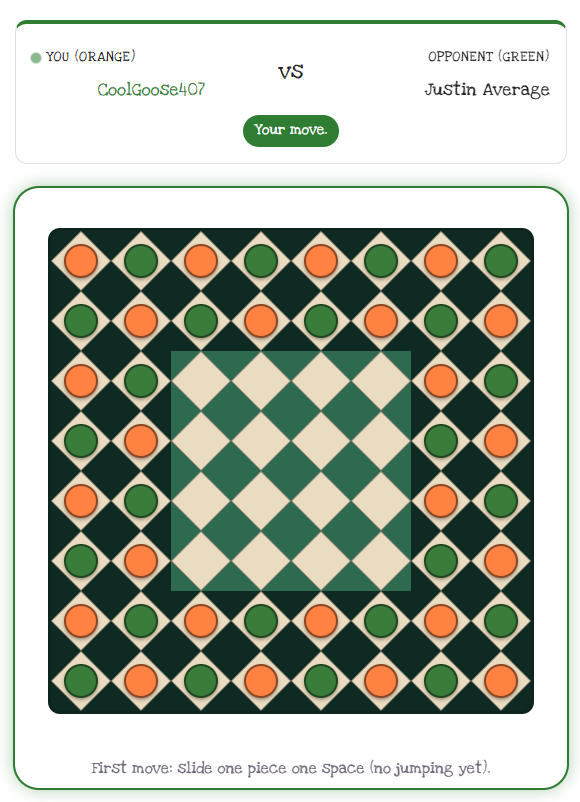
How to play Throne Room
- Pieces slide one square orthogonally across the 8×8 board.
- Jump over any adjacent piece, chaining multiple jumps in one turn.
- Opponent pieces are captured when jumped, but your own pieces can be jumped without being captured.
- The 4x4 center squares form the Throne Room — the contested heart of the board.
- You win when your opponent has no pieces left in the Throne Room (or no legal move remains).
Play Throne Room your way
- Invite a friend and play together in real time, or match against a computer opponent.
- Adjustable computer difficulty — Easy, Medium, or Hard — so every game stays a challenge.
- Works on phone, tablet, and desktop, right in the browser. Nothing to install.
- Free to play. Start instantly as a guest, or create a free account to keep your stats and friends.
Throne Room — frequently asked questions
How is Throne Room different from checkers?
Pieces slide orthogonally and jump like checkers, but the goal is the central 4×4 Throne Room — you win by clearing your opponent's pieces out of it, not off the whole board.
Can I jump my own pieces in Throne Room?
Yes. You can jump over your own pieces without capturing them to set up chains — only opponent pieces you jump are removed.
Can I play Throne Room against the computer?
Yes. Play a friend in real time or take on a computer opponent at Easy, Medium, or Hard.
Do I need an account to play Throne Room?
No — start instantly as a guest in your browser. Sign up free only if you want to keep stats and friends.